Batch Watermark Images & Videos: Add Text & Logos Offline
Adding a watermark to one photo is easy. Adding it to 300 photos — or 50 videos — is where most people give up. Batch watermarking solves that: you load a folder, set your watermark once, and the tool stamps every file automatically. Here's how it works, with real screenshots of a tool that does it for both images and videos, entirely offline.
Batch watermarking: the short answer
Batch watermarking means stamping text or a logo onto many images or videos in a single run, instead of editing each file one at a time. The fastest way to do it without Photoshop is a dedicated batch watermark tool: you drag in a folder, choose a text or image watermark, set the position, size, and opacity once, and the app processes every file automatically. Formatif Pro's watermark tool does this for both images and videos — offline, with no uploads, no file size limits, and a one-time license. You can even assign a different watermark to each file in the same batch.
Why batch watermarking matters
A watermark is a visible overlay — text or a logo — placed on top of your image or video to show ownership. Photographers use it to stop clients from using unwatermarked proofs. Real-estate agents use it to brand listing photos. Online sellers use it to protect product shots from being scraped and reposted. Creators use it to put their handle on every clip they ship.
The problem is scale. Watermarking one image takes ten seconds in any editor. Watermarking a hundred images by hand is an afternoon of clicking. That's where batch processing changes everything: set the watermark once, run it across an entire folder, and walk away.
Batch watermarking is useful for day-to-day work, not just big productions. A dozen product photos for a shop update. A folder of client proofs to send out. A month of social media clips. All of these are “just add a quick watermark” jobs — and all of them are tedious by hand.
Why most watermark tools fall short
There is no shortage of “watermark” tools. But almost all of them force you into a compromise:
Online tools upload your files to a server
Browser-based tools like iLoveIMG are convenient, but every photo you watermark leaves your computer. For client work, legal evidence, or personal photos, that's a privacy risk — and most free tiers cap file size.
Photoshop is overkill for a simple watermark
Photoshop can watermark anything, but it requires a subscription (about $22.99/mo) and a genuine learning curve. Its batch 'Actions' feature is powerful but fiddly — not something you'd reach for when you just need to stamp a logo on 20 photos.
Most batch tools are images-only or videos-only
reaConverter, PhotoX, and Total Watermark handle images. Video Watermark Pro handles videos. Almost nobody handles both in the same app with the same interface — so you end up buying and learning two tools.
Almost none let you customize per file in a batch
The typical batch tool applies one watermark to every file. If you want a different caption or logo on each image, you're back to editing one at a time.
Free CLI tools mean scripting, not clicking
FFmpeg and ImageMagick can batch watermark for free — but only through command-line scripts. Powerful, yes. But it's the opposite of a drag-and-drop workflow.
How Formatif Pro's batch watermark tool works
Formatif Pro ($8.95 one-time) includes a watermark tool that covers both images and videos in a single, genuinely visual interface. There is no scripting, no command line, and no subscription. The workflow is four steps:
Add your files
Drag in a folder, select a handful of files, or add hundreds at once.
Choose text or logo
Pick a text watermark (your name, handle, copyright line) or an image watermark (your logo, signature, or icon).
Tune the look
Set position, size, opacity, and rotation. For text: font, color, and point size. For logos: scale and transparency.
Run the batch
Apply the same watermark to every file — or set a different one per file. Then let it run through the whole batch.
Text watermarks: names, handles, and copyright lines
A text watermark is the fastest way to mark ownership. Type your name, brand, or “© 2026” line, then control exactly how it looks. Formatif Pro gives you full control over the font, color, size, opacity, and rotation — plus six preset positions (all four corners, center, or a custom X/Y spot).
Adding a text watermark to an image in Formatif Pro — set the font, size, color, opacity, and position, then apply it to the whole batch.
Logo watermarks: stamp your brand on every image
For branding, a logo watermark beats text. Use a transparent PNG of your logo (no background box), then scale it to the right size and dial down the opacity so it sits unobtrusively in a corner. Formatif Pro handles the scale, opacity, rotation, and position of image watermarks — and lets you reuse the same logo across every file in the batch.
Adding a logo (image) watermark to a photo in Formatif Pro — resize, set opacity, and position the logo, then run the batch.
Tip: use a transparent PNG for logos
A logo on a solid background (like a JPEG) will appear as a visible box over your photo. A transparent PNG keeps only the logo itself, so the watermark blends into the image. Formatif Pro preserves that transparency when it overlays the logo.
The feature most tools don't have: a different watermark per file
Here's the biggest difference between Formatif Pro and almost every other watermark tool. In a typical batch, you set one watermark and it gets stamped on everything.
Formatif Pro lets you either:
- Apply the same watermark to every image and video in the batch — the classic bulk workflow.
- Assign a custom watermark to each file — a different caption, name, or logo per image. You select each file and set its own watermark, then run them all in one pass.
That second option is rare. It's the difference between “stamp the same logo on 100 proofs” and “put each client's name on their own photo” — and it turns a niche batch tool into something you reach for daily.
Batch watermark videos too — same tool, same workflow
Most watermark tools are images-only. Formatif Pro's watermark tool works on videos exactly the same way it works on images. You can add a text watermark or a logo watermark to a folder of videos, with position, opacity, and scale controls — plus a live preview so you see the result before you commit to the whole batch.
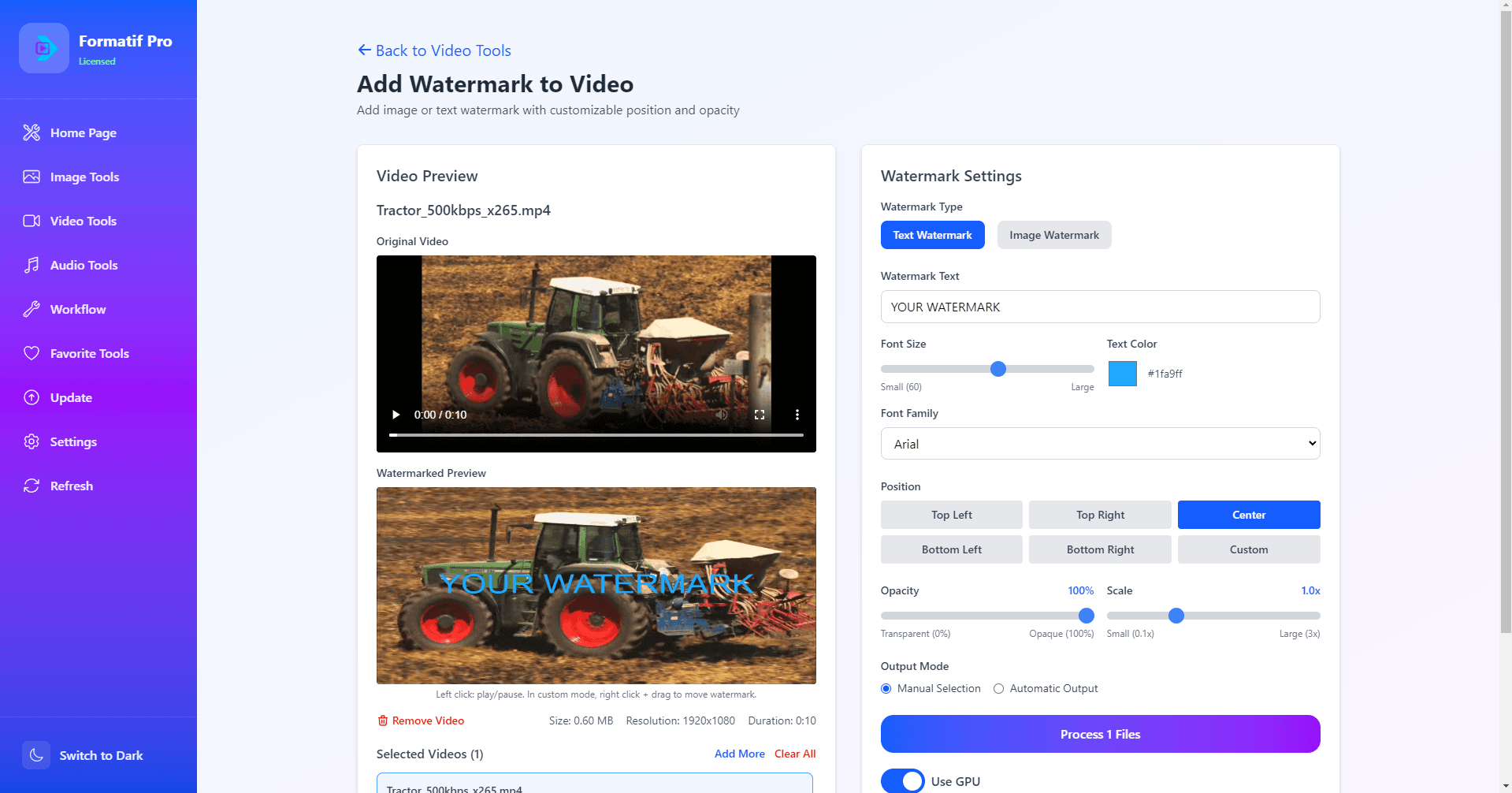
Formatif Pro's video watermark tool — add text or logo watermarks to an entire batch of videos, with a live preview before exporting.
Under the hood, Formatif Pro uses the same engines professionals script by hand — ImageMagick for images and FFmpeg for video — but wraps them in a drag-and-drop GUI so you never touch a command line.
Batch watermark tools compared
| Tool | Price | Images | Videos | Per-file custom | Offline | Learning curve |
|---|---|---|---|---|---|---|
| Formatif Pro★ | $8.95 one-time | ✓ | ✓ | ✓ | ✓ | Easy — drag & drop GUI |
| Photoshop | $22.99/mo | ✓ | ✗ | ✗ | ✓ | Steep |
| iLoveIMG (online) | Free | ✓ | ✗ | ✗ | ✗ | Easy — but uploads files |
| PhotoX | Paid | ✓ | ✗ | ✗ | ✓ | Moderate |
| Video Watermark Pro | Paid | ✗ | ✓ | ✗ | ✓ | Moderate |
| FFmpeg / ImageMagick | Free | ✓ | ✓ | ✓ | ✓ | Terminal / scripting |
"Per-file custom" = can assign a different watermark to each file in a single batch. Only Formatif Pro combines images + videos + per-file customization in one GUI, offline.
Frequently asked questions about batch watermarking
How do I watermark multiple images at once?
Use a batch watermark tool. Load a folder or drag in hundreds of images, choose a text or logo watermark, set the position, size, and opacity once, then run the batch. Formatif Pro does this offline with no file size limits.
What is the easiest way to watermark photos without Photoshop?
A dedicated batch watermark tool is the simplest option — no subscription, no learning curve. Drag in a folder, pick a text or logo watermark, and stamp every photo in one click. Formatif Pro adds this to a full offline media toolkit.
Can I add a different watermark to each image in one batch?
Yes — a feature most tools lack. Formatif Pro lets you apply the same watermark to every file, or assign a custom watermark (different text or logo) to each individual file, then run them all in one pass.
Can you batch watermark videos?
Yes. Formatif Pro's watermark tool works on videos the same way it works on images — text or logo watermarks, with position, opacity, scale, and a live preview. Most tools handle either images or videos; Formatif handles both.
Is there a free way to batch watermark images offline?
FFmpeg and ImageMagick can batch watermark for free via command line, but require scripting. Online tools are free but upload your files to a server. Formatif Pro is a low one-time cost for a GUI that batch watermarks offline.
Batch watermark your images and videos — offline.
Try Formatif Pro's watermark tool on your own files. Add text or logo watermarks to entire folders, assign a different watermark per file, and process images and videos in the same app. Formatif Pro $8.95 one-time, with a 3-day free trial and no subscription.
Written by
Founder of Formatif, a local-first offline media processing suite for Windows and Linux. Hadi writes about video, image, and audio formats, compression, and privacy-first desktop workflows.