Sky Replacement for Real Estate: Fix Gray-Day Listings in Bulk
Shoot day brought storms instead of sun. Reshoots cost days; sky replacement costs minutes — across the whole exterior set, with one reusable template.
Same house, same day, different sky
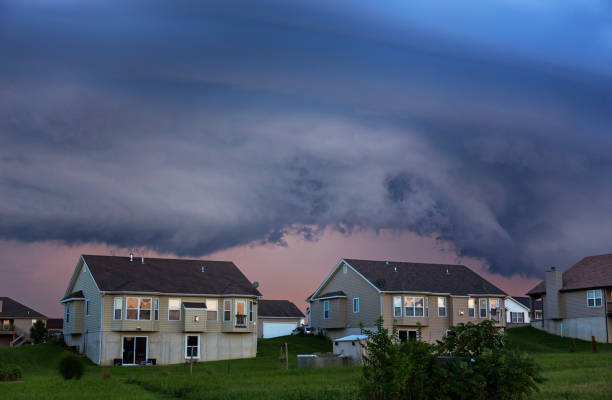
Before — storm sky, flat light
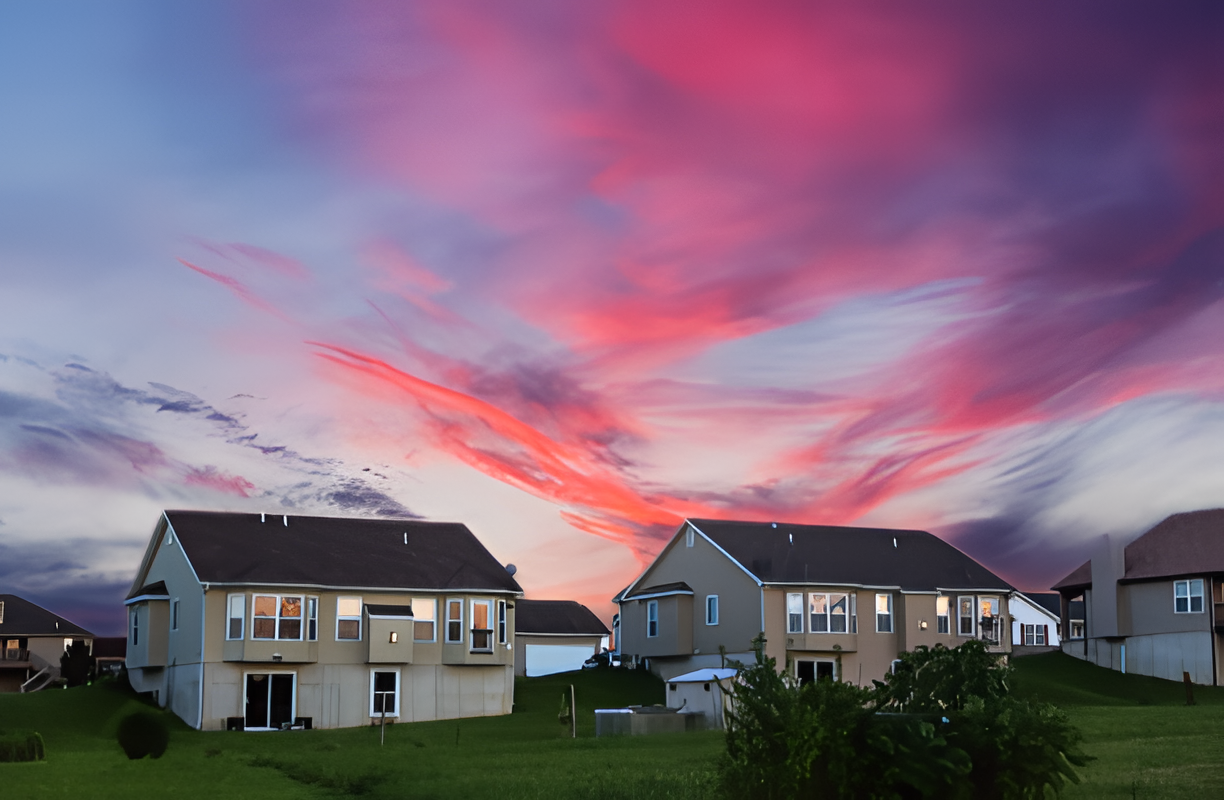
After — sky replaced, denoised, 2x upscaled

The replacement sky
Watch the Real Estate template run
Sky replacer → denoiser → 2x upscale, running on a batch of listing exteriors.
The Real Estate template (sky → denoise → upscale)
- Sky replacer. Swap gray for a sky from your proven library — matched for light direction and time of day.
- Denoiser. Gray-day shots carry noise from high ISO and flat light; clean it before enlarging anything.
- 2x upscale. Restore crisp edges on rooflines, windows, and landscaping for zoom-ready listings.
Same sky across every exterior keeps the set coherent — different skies per photo reads as chaotic the moment buyers swipe through the gallery.
Quick Solution
Gray-day shoot in, blue-sky gallery out.
That template above ships built-in: Formatif AI runs the Real Estate quick template — sky replacer, denoiser, 2x upscale — over whole exterior folders on your local GPU, with per-file preview before anything reaches a listing. No per-image fees, no uploads of client properties.
Realism rules + the disclosure line
Replacements fail on lighting mismatch, not on the swap: noon sun over dusk-lit houses, shadows disagreeing with the new sun, hyper-dramatic skies over modest ranches. Match direction and hour, prefer clean blue over spectacle — restraint photographs as honesty.
Disclose per your MLS. Weather-only sky swaps are widely accepted, but many systems require flagging materially edited photos — and structural edits (removing lines, damage, neighbors) are a different category entirely. When in doubt, disclose: it costs nothing and protects the sale. Pair this with our bulk editing recipe for the interiors.
Sky replacement questions, answered
Replace skies in listing photos?
Weather-only swaps: yes, industry standard. Never alter the property itself without disclosure; check MLS rules.
Make replaced skies look real?
Match light direction, time of day, and restraint. Mismatched lighting — not the swap — is what looks fake.
Bulk sky replacement?
One template (sky → denoise → upscale) over all exteriors. Same sky everywhere reads deliberate; mixed skies read chaotic.
Disclose edited photos?
Often required for material edits. Sky weather swaps widely accepted; structural edits must be disclosed. When in doubt, disclose.
Which replacement sky to use?
High-res, matching light, commercially licensed. Keep 5–10 proven skies; reuse builds brand consistency.
Fix a whole gray-day shoot?
Run the Real Estate template over exteriors; spot-check rooflines, trees, antennas at 100% before upload.
Keep learning
Blue skies, every shoot, whatever the weather.
Formatif AI runs sky replacement, denoise, upscaling, and batch workflows on your local GPU — one-time purchase, 3-day free trial, no per-image fees. Pair with Formatif Pro ($8.95) for classic conversion workflows.
Written by
Founder of Formatif, a local-first offline media processing suite for Windows and Linux. Hadi writes about video, image, and audio formats, compression, and privacy-first desktop workflows.