Best Local AI Upscaler in 2026: 4 Tools Tested, No Cloud Upload
AI upscaling used to mean uploading your image to a cloud service and hoping the results came back before you lost interest. In 2026, the best upscaling tools run on your own GPU — faster, more private, and with no per-image credit system. Here is a comparison of four local tools, plus real before and after results you can inspect yourself.
Pick by budget
| Budget | Pick | Why |
|---|---|---|
| Free | Upscayl | Open source, fully offline, clean GUI. Image upscaling only. |
| Free, scripted | Real-ESRGAN | The same class of model driven from the command line for pipelines. |
| $12.95 one-time | Formatif AI | Upscaling plus video, face restoration, denoising and folder workflows. |
| $99+ one-time | Topaz Gigapixel | The image-quality benchmark for photographs, and macOS support. |
Full comparison further down, or jump to the four tools.
What is the best local AI upscaler in 2026?
Our pick for most people is Formatif AI, because upscaling is one tool inside a suite that also covers video, face restoration, denoising and folder batches, for a single $12.95. It is not the quality leader — that is Topaz Gigapixel — and it is not the cheapest, because Upscayl is free. It is the option that removes the most steps.
If your only job is enlarging a handful of images, use Upscayl at no cost. If image quality is the deciding factor and you work on macOS, buy Topaz Gigapixel. If you are scripting an automated pipeline, use Real-ESRGAN. The rest of this page explains each of those calls.
What does “local” mean in an image upscaler?
A local image upscaler runs the neural model on your own hardware and reads the file straight from your disk. Nothing is transferred, so there is no upload step, no queue, no per-image charge, and no retention window to read. A cloud upscaler has to receive the image before it can process it, which is why its free tiers are usually metered by credits and often capped in resolution.
Is a local upscaler as good as a cloud one?
On ordinary photographs, local models are usually close enough that you will not notice a difference in normal viewing. Where cloud services can still pull ahead is the hardest material — very fine detail, damaged sources — and in the newest generative features, which frequently do run server-side. Our honest position is that local upscaling has closed most of the gap on typical work, and that you should test your own worst-case images rather than trusting any comparison table, including this one.
Why local AI upscaling beats cloud-based alternatives
Cloud AI upscalers — and there are many — share the same fundamental flaw as any cloud tool: your images must be uploaded before processing begins. For a single casual photo, this is tolerable. For anything involving client work, personal archives, or batch processing, it is a non-starter.
Privacy
Client photos, personal archives, and pre-release creative work never leave your machine. No server sees them, no retention policy applies.
Speed
A modern GPU processes images in seconds locally. The same file takes minutes when you add upload and download time to the equation.
No credit meters
Cloud upscalers charge per image. Local tools are one-time purchases or free — you upscale 10 images or 10,000, the cost is the same.
The best local AI upscaling tools right now
Formatif AI
Local AI upscaling with a batch workflow builder
$12.95 one-time
Windows
Formatif AI is a desktop application that runs 10 neural models on your local GPU — including 2x and 4x image upscaling, face restoration, denoising, background removal, and video resolution boost. What sets it apart is the batch workflow builder: chain operations like "remove background → upscale 2x → denoise" and run the saved recipe on entire folders. All processing is local — no uploads, no per-image credits, no subscription. One-time purchase of $12.95 with a 3-day free trial.
Strengths
- 10 neural models — upscaling, restoration, background removal, and video enhancement
- Batch workflow builder — chain AI operations and run on folders
- 100% local GPU processing — no uploads, no credits, no subscription
- Video upscaling and denoising in addition to image models
Limitations
- No macOS version currently
- Requires a decent GPU for best performance
- Newer product with a smaller community than Topaz
Upscayl
Free, open-source AI image upscaler
Free
Windows, macOS, Linux
Upscayl is a free, open-source desktop app that wraps Real-ESRGAN and other open models in a clean GUI. You pick a model, load your images, and it upscales them on your GPU. No internet required after the initial model download. For a free tool, the interface is surprisingly polished — it feels more like a commercial product than an open-source side project.
Strengths
- Completely free and open-source
- Clean, modern GUI — not a CLI or research prototype
- Multiple built-in models for different image types
- Cross-platform with regular updates
Limitations
- Images only — no video upscaling
- No batch workflow builder for chained operations
- Limited model selection compared to paid tools
- No face restoration or specialized enhancement models
Topaz Gigapixel AI
The established premium upscaler for photographers
$99.99 one-time
Windows, macOS
Topaz Gigapixel AI is the most well-known dedicated AI upscaler. It uses proprietary neural models trained specifically for photographic enlargement — up to 6x — with specialized modes for faces, landscapes, and low-resolution sources. It integrates directly with Lightroom and Photoshop. If you are a photographer who regularly prints large-format work, this is the tool the industry has standardized around.
Strengths
- Industry-leading model quality for photographic images
- 6x upscaling with specialized face and landscape modes
- Lightroom and Photoshop plugin integration
- Years of model refinement and a large user base
Limitations
- Images only — no video upscaling or enhancement
- No batch workflow builder; queue-based processing
- Higher one-time cost than alternatives
- Requires a powerful GPU for reasonable processing speed
Real-ESRGAN
The open-source engine behind many upscalers
Free (open-source)
Windows, macOS, Linux (via command line or third-party GUIs)
Real-ESRGAN is not an app — it is the open-source AI model that powers many upscaling tools, including Upscayl. Developed by researchers at Tencent, it excels at restoring real-world low-resolution images with realistic detail reconstruction. If you are comfortable in a terminal and want to integrate upscaling into automated pipelines, Real-ESRGAN is the most flexible option available at zero cost.
Strengths
- State-of-the-art open-source model for real-world images
- Completely free with no restrictions
- Scriptable — ideal for automated pipelines
- Active research community and model variants
Limitations
- Command-line only — no official GUI
- Requires technical setup (Python, dependencies, GPU drivers)
- No batch workflow builder or visual preview
- No video upscaling in the base model
Watch it Work
See AI upscaling in Formatif AI.
This demo shows the image upscaling tool in Formatif AI: loading a low-resolution image, applying the 2x upscaler model, and seeing the result — all processed on a local GPU with no cloud upload.
Real Results
Before and after: inspect the difference yourself.
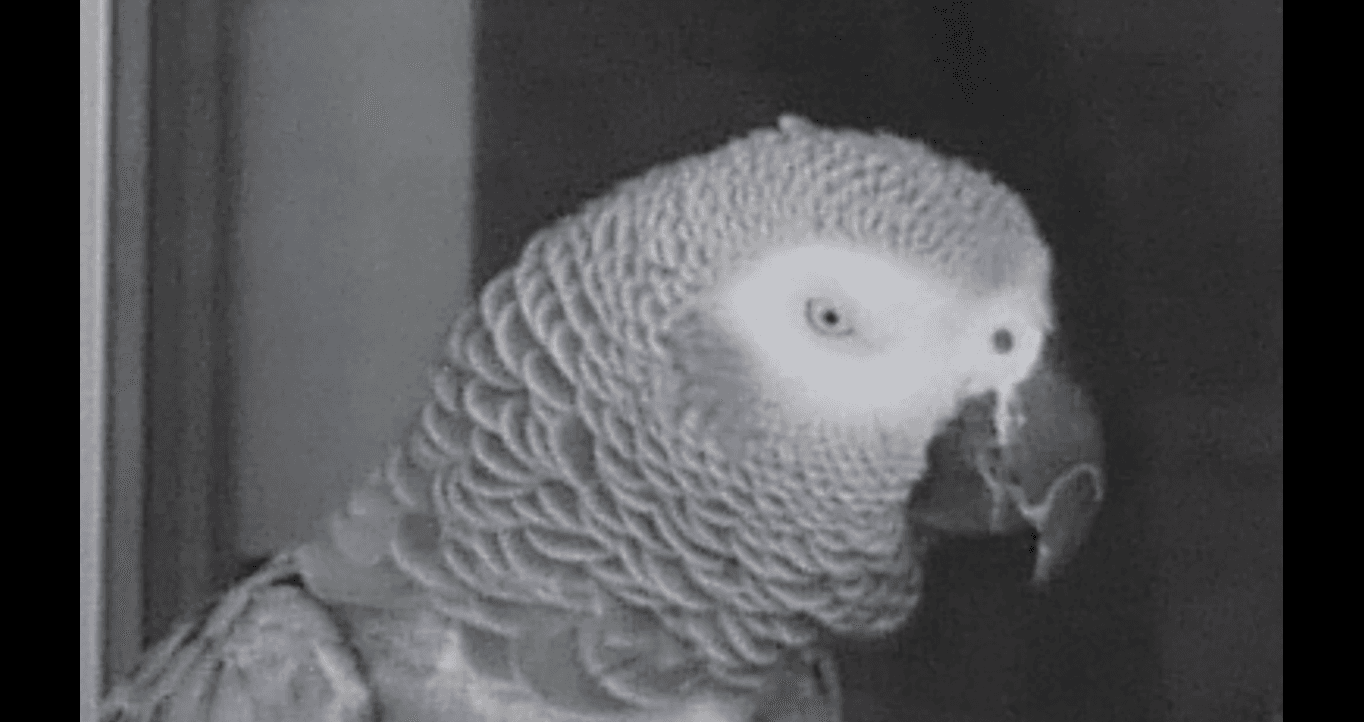
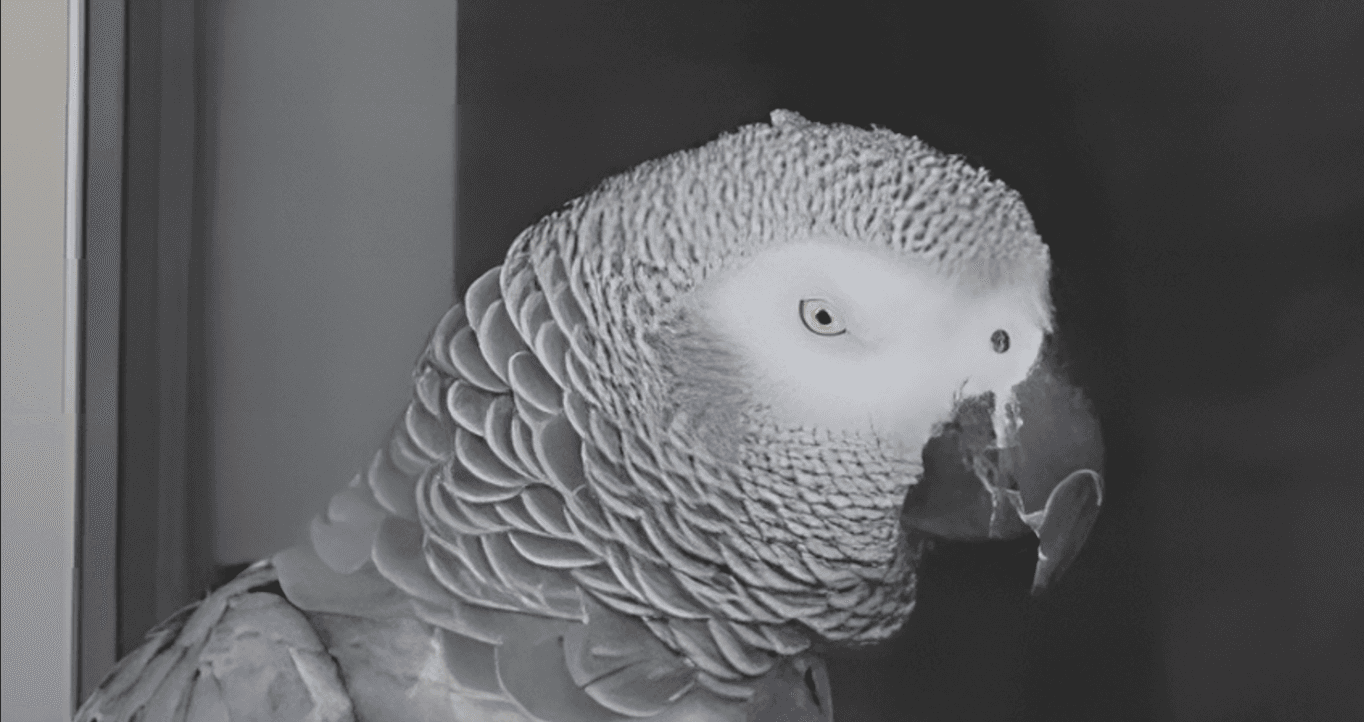
The two images below are the same photo. The left is the original low-resolution source. The right is the result after 2x AI upscaling in Formatif AI — processed entirely on a local GPU. Look at the detail in the eyes, the texture in the feathers, and the sharpness of the beak. This is what neural upscaling recovers that traditional resizing loses.
Original
Low-resolution source image
AI Upscaled 2x
Processed by Formatif AI — local GPU
How to upscale an image locally, step by step
Upscaling an image locally is the same operation as doing it in the cloud, minus the transfer. This order produces the best result on real files, and it takes about two minutes once you have done it once.
- Work out the target size first. For print, multiply the finished inches by 300 — a 12-inch print needs 3,600 pixels on the long edge. For screen, use the resolution you actually deliver at.
- Choose the multiplier that reaches it, not the biggest one. If a 1,200-pixel image needs 3,600 pixels, 4× is roughly right and 2× leaves you short. Upscaling past your target adds file size and processing time without adding visible quality.
- Denoise first if the source is noisy or heavily compressed. An upscaler will enlarge JPEG artefacts, grain and dust just as faithfully as the detail you wanted.
- Run it on the folder, not the file. Batch processing is where local tools separate from browser ones: queue hundreds of images, walk away, come back to a finished directory.
- Compare at 100%, not on a thumbnail. Zoomed-out previews hide exactly the artefacts upscaling is meant to fix.
Upscaler or enhancer — what is the difference?
An upscaler adds pixels: the output is larger than the input. An enhancer improves the pixels you already have — removing noise, sharpening, correcting tone — and often leaves the dimensions unchanged. The two get described with the same words, which is why searches for a local AI image enhancer and for a local upscaler land on the same tools. Formatif AI ships both kinds of model and lets you chain them, so a noisy source can be denoised and upscaled in one pass over a folder.
Do you need a GPU to upscale images locally?
It helps enormously, and for some tools it is required. Upscayl and Real-ESRGAN will run on CPU, slowly. Formatif AI requires a DirectX 12 compatible GPU — NVIDIA GTX 900 series or newer, or AMD RX 400 series or newer — with 6 GB+ VRAM recommended, so integration graphics will not run its models. If your machine has no discrete GPU, Upscayl on CPU is the honest starting point, and the wider local restoration pipeline covers how upscaling fits alongside denoising and scan settings.
Quick comparison
| Tool | Price | GUI | Video upscale | Batch WF | Face restore | BG remove |
|---|---|---|---|---|---|---|
| Formatif AI★ | $12.95 | ✓ | ✓ | ✓ | ✓ | ✓ |
| Upscayl | Free | ✓ | ✗ | ✗ | ✗ | ✗ |
| Topaz Gigapixel | $99.99 | ✓ | ✗ | ✗ | ✓ | ✗ |
| Real-ESRGAN | Free | ✗ | ✗ | ✗ | ✗ | ✗ |
Best local AI upscaler: FAQ
What is the best local AI upscaler?
For most workflows, Formatif AI is the strongest all-round choice because it combines 2× and 4× image upscaling with face restoration, denoising, video upscaling and folder batch workflows for a single $12.95 one-time price. If you only need free image upscaling, Upscayl is excellent. If maximum image quality and macOS support matter more than price, Topaz Gigapixel is the benchmark.
How do I upscale an image locally?
Install a desktop tool that runs the model on your own machine, work out the target pixel size (finished inches multiplied by 300 for print), pick the multiplier that reaches it, denoise first if the source is noisy, then run the upscale. Nothing is uploaded at any point. Upscayl, Real-ESRGAN, Topaz Gigapixel and Formatif AI all work this way.
Is there a free local AI upscaler?
Yes, two. Upscayl is a free open-source desktop app with a graphical interface, and Real-ESRGAN is the open-source model it wraps, usable from the command line. Both run entirely on your machine with no upload. Their limits are that they are image-only — no video upscaling, no face restoration, and no workflow chaining across operations.
Do local AI upscalers need a GPU?
Not always, but usually in practice. Upscayl and Real-ESRGAN will run on CPU, though slowly. Formatif AI requires a DirectX 12 compatible GPU — NVIDIA GTX 900 series or newer, or AMD RX 400 series or newer — with 6 GB+ VRAM recommended. Topaz Gigapixel also wants a capable GPU for reasonable speed. With only integrated graphics, expect CPU upscaling to work but to be slow.
Is a local AI upscaler as good as a cloud one?
On typical photographs, local models are close enough that most people cannot tell the difference in normal viewing. Cloud services can still hold an edge on the hardest material and in the newest generative features, which often run server-side. The trade is less quality against privacy than convenience against control — and only you can decide which of those your files deserve.
What is the difference between an AI upscaler and an image enhancer?
An upscaler increases the pixel dimensions of an image, so the output is larger than the input. An enhancer improves the pixels already present by removing noise, sharpening or correcting tone, often at the same size. Many tools labelled enhancers do both, which is why the terms are used interchangeably. Formatif AI includes upscaling and denoising models and lets you chain them in one workflow.
Can I upscale a whole folder locally?
Yes, and it is one of the strongest reasons to work locally. Upscayl supports batch image queues, Real-ESRGAN processes folders from the command line, and Formatif AI takes a folder including subfolders — chaining upscaling with denoising and background removal in a saved workflow, with per-file progress and the ability to skip a bad file without stopping the run.
Does AI upscaling actually add detail?
It reconstructs plausible detail rather than recovering information that is genuinely gone. That distinction matters. A 4× upscale of a soft photograph will look sharper and more textured, but the model is inferring what should probably be there, not restoring what was. For most purposes that is exactly what you want — just do not treat an upscaled image as evidence of original detail.
Keep reading
Try local AI upscaling on your own images.
Formatif AI ($12.95 one-time) runs 10 neural models on your GPU — upscaling, denoising, face restoration, background removal, and video enhancement. Batch workflow builder included. 3-day free trial with no credit card. Bundle with Formatif Pro at $16.95 for the complete media processing suite.
Written by
Founder of Formatif, a local-first offline media processing suite for Windows and Linux. Hadi writes about video, image, and audio formats, compression, and privacy-first desktop workflows.